
ChatGPT, like any sophisticated digital service, is susceptible to occasional downtime. Downtime refers to periods when the service becomes inaccessible or does not function as expected, interrupting user interactions. Understanding the root of these interruptions requires examining technical, operational, and external factors that influence service availability.
Several causes contribute to ChatGPT’s downtime. Common technical reasons include server overloads, software bugs, and maintenance activities. Server overload occurs when demand exceeds the system’s capacity, especially during periods of high user traffic. Additionally, software bugs or code-level issues can temporarily disable core functionalities. Maintenance activities, such as updates or system optimizations, may also lead to planned outages, as these are critical for ensuring long-term service reliability.
Operational challenges further shape downtime occurrences. Infrastructure malfunctions, such as hardware failures, can take essential components offline. Power outages or network disruptions at data centers can result in unexpected service interruptions. In some cases, service providers may encounter third-party dependency issues, such as outages in cloud platforms or external APIs that support ChatGPT’s operations.
External factors also play an important role. Cyberattacks, such as Distributed Denial of Service (DDoS) attacks, can force the system into unusable states by flooding the servers with malicious traffic. Natural disasters or unforeseeable events, like regional network outages, are other contributors that may limit accessibility.
During downtime, users are often met with error messages or delayed responses, making troubleshooting a priority for service teams. Companies often provide updates through status pages or community forums to keep users informed. While interruptions are inevitable, proactive monitoring and contingency planning from service providers help minimize their frequency and duration.
Common Causes of ChatGPT Outages
ChatGPT outages are often linked to various technical, operational, and external factors that can compromise the service’s availability or functionality. Understanding these causes can help users navigate disruptions more effectively and mitigate frustration during downtimes.
1. Server Overload
One of the primary reasons for ChatGPT outages is server overload. When an unusually high number of users attempt to access the system simultaneously, it may strain hosting infrastructure beyond its handling capacity, particularly during peak usage times. This can result in reduced responsiveness, partial failures, or complete service outages.
2. Maintenance and Updates
Scheduled maintenance and software updates can temporarily disrupt access to ChatGPT. Service providers often implement updates to improve functionality, fix bugs, or enhance security measures. During such intervals, the system may be purposefully taken offline to ensure smooth implementation. While these interruptions are usually planned and communicated, they can still catch users off guard.
3. Software Glitches
Unexpected glitches or bugs within the ChatGPT software may lead to operational failures. Such technical errors can disrupt its core processes, causing unexpected crashes or degraded performance. These glitches may originate from untested code changes, integrations, or compatibility issues.
4. Internet and Network Issues
Connectivity problems, whether on the user’s end or the server’s side, can also contribute to outages. If the hosting network experiences disruptions or bandwidth limitations, users might encounter difficulties accessing ChatGPT’s services. Additionally, regional internet outages can create localized access problems.
5. Cybersecurity Threats
Targeted attacks such as Distributed Denial of Service (DDoS) attacks can compromise the availability of ChatGPT. Hackers often exploit vulnerabilities to overload the system intentionally, making it unavailable to legitimate users. Such attacks necessitate swift mitigation efforts from the service provider to restore functionality.
6. Third-Party Integration Failures
As ChatGPT relies on specific operational frameworks and APIs to interact with external systems, failures in these third-party integrations can knock parts of the service offline. If any linked system experiences downtime or compatibility problems, it can ripple through ChatGPT’s functionality.
By recognizing these common causes, users can better understand why outages occur and adjust their expectations accordingly during downtime.
Server Overload: The Role of Traffic Spikes
Traffic spikes play a critical role in server overload, often causing instability or complete downtime for online platforms. Sudden surges in user activity can overwhelm servers, especially if infrastructure is not designed to handle significant fluctuations in demand. These spikes can originate from various sources, such as viral events, significant product launches, or even unexpected popularity driven by social media.
High traffic volumes typically strain essential server resources, including CPU, memory, and storage capacity. ChatGPT, being a cloud-based AI service, relies on complex backend systems to process large volumes of concurrent requests. When user activity rapidly exceeds the platform’s computational threshold, servers may fail to allocate sufficient resources, leading to degraded performance or outright unavailability.
Load balancing mechanisms are employed by many platforms to distribute incoming traffic efficiently across multiple servers. However, even with such measures, rapid and unpredictable spikes can exceed pre-planned contingencies. When this occurs, server queues become overwhelmed, forcing requests to either be delayed or rejected. Such issues are exaggerated during peak usage hours or global events, when multiple users attempt access simultaneously.
Caching strategies and scalable infrastructure mitigate some risks, but these solutions have limitations. For instance, caching only assists in reducing redundant computations, while dynamic queries still impose significant strain. Scalability, on the other hand, requires adequate resource allocation and may not respond sufficiently in real-time to unexpected surges.
Ultimately, traffic spikes present a significant challenge for AI-driven platforms. They underline the importance of robust infrastructure and adaptive resource scaling in maintaining consistent service reliability under unpredictable demand conditions.
Technical Maintenance and Upgrades Explained
Technical maintenance and upgrades are essential operations that ensure the optimal performance, security, and functionality of ChatGPT. Such activities are planned and executed by developers to resolve existing issues, implement improvements, and adapt the system to evolving user requirements or technological advancements.
Routine maintenance often involves tasks like patching vulnerabilities, updating software dependencies, and optimizing server infrastructure. These updates mitigate security risks, enhance compatibility with newer technologies, and improve the overall reliability of the system. Downtime during maintenance is often necessary to prevent disruptions that could arise from making changes while the system is live.
Upgrades, on the other hand, introduce new features or enhance existing functionality. These could range from refining response accuracy and improving conversational flow to scaling hardware resources to better manage increasing user traffic. Upgrades may also address backend optimizations, such as refining algorithms, increasing processing efficiency, or integrating cutting-edge artificial intelligence research.
Planned maintenance or upgrades may require temporary suspensions of service. In many cases, users are notified in advance via public announcements, ensuring adequate transparency. Such events typically occur during non-peak hours to minimize inconvenience. However, some updates or maintenance activities are emergent, triggered by unexpected technical issues or vulnerabilities requiring immediate attention.
Service restoration after maintenance or upgrades is generally seamless and accompanied by improved performance or new capabilities. Users might observe faster load times, fewer errors, or enhanced conversational accuracy post-upgrade. Technical teams continuously monitor post-maintenance performance to address residual glitches promptly.
Understanding the role of maintenance and upgrades provides insight into why temporary disruptions occur in ChatGPT’s services. These measures are not only routine but also vital to ensuring long-term operational stability and user satisfaction.
The Impact of Bugs and Software Issues
Software bugs and related technical glitches can disrupt the functionality of AI platforms like ChatGPT, occasionally bringing services to a complete halt. These issues often arise due to complexities inherent in software systems, where millions of lines of code must interact seamlessly. A single anomaly, such as a flawed algorithm or unexpected user input, may cascade into larger, system-wide problems.
A common source of disruptions is deployment updates. When system upgrades or new features are introduced, underlying code changes can inadvertently trigger unforeseen errors. AI models are particularly sensitive during these periods, as they rely heavily on intricate configurations and interdependencies both to process data and deliver outputs.
Another potential cause stems from server-side bugs. Issues in backend systems handling user requests, database queries, or authentication processes can manifest as service outages. For instance, mismanagement of query loads or misaligned server configurations might impede request processing, leaving users unable to access ChatGPT.
Memory management errors, such as memory leaks or excessive consumption, further complicate operations. These can degrade performance over time, causing systems to operate below their normal efficiency thresholds or crash entirely. Such problems often require immediate intervention to restore functionality.
Additionally, the integration of AI models with third-party APIs or cloud infrastructure can introduce further risks. If external systems encounter downtime or bugs themselves, the AI platform relying on them may suffer downtime as a result.
These accumulative software issues underline the importance of robust testing protocols, redundancy plans, and post-release monitoring to mitigate significant impacts on users.
Internet Connectivity Problems Affecting Access
Internet connectivity issues can contribute significantly to the inability to access ChatGPT, often leaving users frustrated and unable to pinpoint the true cause. These problems may arise from various sources, including local internet disruptions, network congestion, or hardware malfunctions.
Potential Causes of Connectivity Issues
- Local Internet Problems Local outages within a user’s internet service provider (ISP) are common culprits. ISPs may experience technical difficulties, perform maintenance activities, or face disruptions due to weather conditions or other incidents. Any interruption in the ISP network can hinder access to cloud-based platforms like ChatGPT.
- Network Congestion High traffic during peak usage times can lead to network bottlenecks, especially in densely populated areas. When the bandwidth is overstretched, users may experience slow loading times or complete inability to access services reliant on an active internet connection.
- Hardware Troubles Faulty routers, outdated network drivers, or loose cables can prevent devices from maintaining a stable connection to the internet. These issues are often overlooked, yet they can play a critical role in causing access difficulties.
Indicators for Connectivity Problems
Users experiencing lag or failure to load ChatGPT should check their internet connection by performing routine diagnostics. Some common indicators of internet-related issues include:
- Pages loading slower than usual across multiple websites, not just ChatGPT.
- Frequent disconnects or dropped connections from the Wi-Fi network.
- Difficulty in streaming or downloading content.
Steps to Address Connectivity Issues
To restore access, users can take the following steps:
- Restart Devices Rebooting routers and devices can resolve temporary glitches in network hardware.
- Run Speed Tests Testing the connection speed can identify bandwidth limitations or interruptions.
- Contact ISP Support If problems persist, users may need to reach out to their ISP for assistance or service restoration.
By addressing internet connectivity challenges effectively, users can improve their chances of re-establishing uninterrupted access to ChatGPT services.
User-Specific Issues: Is It Just You?
When ChatGPT appears to be down, it’s essential to determine if the issue is broader or limited to an individual user. Certain factors can cause isolated access problems, even when the service is functioning properly for others. Identifying potential user-specific causes can help troubleshoot and resolve the problem more quickly.
Network Connectivity and Internet Speed
Local internet issues often prevent users from accessing ChatGPT. Unstable or slow connections can disrupt requests from reaching OpenAI’s servers. Users experiencing connectivity problems should verify their network status by checking if other websites or applications are working as expected. Restarting the router or switching to a different network, such as a mobile hotspot, might help isolate the issue.
Browser or App-Specific Problems
Sometimes, the browser being used to access ChatGPT could be the culprit. Outdated browsers, conflicting extensions, or cached data may interfere with proper functioning. Incognito mode or disabling extensions can help identify whether browser issues are responsible. Similarly, in mobile or desktop apps, updates should be checked as older versions may lose compatibility.
Regional Restrictions or ISP Interference
In certain cases, temporary regional restrictions or internet service provider (ISP) limitations may block access to ChatGPT. This can occur if the ISP unintentionally restricts the service’s traffic. Users may try Virtual Private Networks (VPNs) to access the platform, as these can bypass local restrictions or reroute traffic through different servers.
Account-Related Issues
Issues tied to account status, such as login errors or subscription lapses, can also create the appearance of a “down” service. Users should inspect their account credentials and verify whether their subscription plans are active. Resetting passwords or logging out and back in may resolve authentication-related hindrances.
By systematically checking these considerations, users can ensure that the issue is not isolated to their specific situation.
How OpenAI Handles Service Interruptions
OpenAI employs a robust set of strategies and tools to detect, diagnose, and address service interruptions that may affect the availability of ChatGPT. These protocols are specifically designed to minimize disruption and restore functionality promptly, ensuring users experience minimal inconvenience during outages.
To begin with, OpenAI uses advanced monitoring systems to assess the health of its servers and infrastructure. These systems continuously track metrics such as server load, API response times, and error rates. When abnormalities are detected, automated alerts notify the operations team, enabling swift action. This proactive approach ensures any emerging issues are promptly recognized, even before they escalate to full outages.
In cases of widespread disruptions, OpenAI prioritizes transparent communication with its users. Status updates are typically published on the OpenAI Status Page, which serves as the primary platform for sharing real-time information. Users can find details regarding the nature of the issue, affected services, and an estimated timeline for resolution. This process fosters trust and keeps all stakeholders informed during technical challenges.
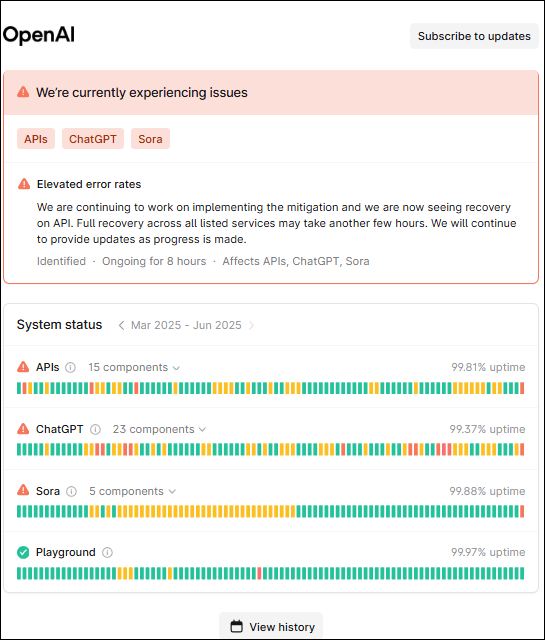
To address outages, OpenAI leverages a dedicated engineering team with expertise in managing large-scale systems. These professionals work to identify root causes, often employing methods such as log analysis, load testing, and database audits. In critical scenarios, measures like system rollbacks or server redistributions may be implemented to stabilize services. The organization further conducts post-recovery analysis to extract lessons that will prevent similar issues in the future.
Additionally, OpenAI emphasizes redundant architecture. This includes deploying load balancers, failover mechanisms, and geographically distributed data centers, which collectively enhance system reliability. Such infrastructure design significantly mitigates risks associated with hardware failures and localized disruptions.
By employing both preventative and reactive measures, OpenAI demonstrates its commitment to maintaining a robust and dependable platform for users worldwide.
Steps to Take When ChatGPT Is Down
When ChatGPT experiences downtime, users can take specific steps to navigate the situation effectively and identify suitable alternatives. Below are actionable measures to help mitigate inconveniences caused by the service interruption:
- Verify the Downtime Begin by confirming whether the issue is widespread or local. Check OpenAI’s status page or popular outage reporting platforms like DownDetector for real-time updates. These tools often provide insights into whether the disruption is servicewide or related to personal connectivity issues.
- Check Internet Connectivity Ensure the local internet connection is stable. Sometimes, connection problems may appear similar to service outages. Troubleshooting devices, restarting the router, or trying an alternative network may help confirm the root cause.
- Monitor OpenAI’s Platforms Visit OpenAI’s official website, forums, or social media channels to stay informed about the downtime’s cause and estimated resolution time. Announcements and updates from OpenAI are typically the most reliable sources for service status.
- Explore Alternative AI Tools Select a temporary alternative to ChatGPT for urgent generative AI needs. Other AI platforms, such as Google Bard, Jasper AI, or Bing Chat, may provide functionality suited to the task at hand. These tools can be an immediate substitute until ChatGPT is back online.
- Prepare Backup Plans Develop backup workflows to reduce dependency on a single tool. For instance, local note-taking software, research tools, or traditional brainstorming methods can serve as alternatives for certain use cases when AI tools are unavailable.
- Report the Issue (If Necessary) If the problem seems localized rather than widespread, consider contacting OpenAI’s customer support for tailored troubleshooting assistance. Providing details about the issue can also help OpenAI refine its services for future reliability.
By following these steps, users can proactively address disruptions and maintain productivity despite temporary challenges.
Alternative Resources to Use During Outages
When ChatGPT experiences downtime, users may consider various alternative tools and platforms to meet their immediate needs. Depending on the use case, different options can effectively serve as replacements for generating content, answering queries, or assisting with complex tasks. Below are some viable alternatives:
- Other AI-Powered Chatbots and Tools Platforms like Google Bard, Claude by Anthropic, and Jasper AI provide similar capabilities for natural language processing. They can assist with generating text, answering questions, and brainstorming ideas. Each tool offers unique strengths, such as handling creative tasks or specific professional use cases.
- Search Engines for Immediate Answers Leveraging search engines like Google or Bing is a reliable option for quick factual answers or research. Advanced search techniques, such as using quotation marks for exact phrases, can refine results, ensuring better accuracy and relevancy.
- Traditional Resources Many simple queries or tasks can be addressed through traditional resources, such as books, academic journals, or physical encyclopedias. Libraries and online databases remain dependable for supporting research needs.
- Community-Based Q&A Platforms Websites such as Reddit, Quora, and Stack Exchange can provide diverse perspectives and detailed answers from a variety of contributors. These platforms are particularly useful for niche or highly specific questions.
- Note-Taking and Writing Programs Tools like Microsoft Word, Google Docs, or Notion can help users draft and organize content manually. For creative writing, platforms like Scrivener or Grammarly can assist with composition and editing processes.
These alternatives, though varied in functionality, ensure workflows remain uninterrupted while ChatGPT is unavailable. Users may choose one or combine multiple resources depending on the level of detail or creativity required for their tasks.
Tips to Prevent Downtime Interruptions in the Future
To minimize disruptions caused by potential system outages and maintain seamless access to platforms like ChatGPT, it is crucial to adopt proactive measures. These strategies can help individuals and teams stay productive even during platform downtime.
- Monitor Platform Status Regularly Sign up for platform status updates or utilize third-party tools to monitor service uptime. Knowing in advance about planned maintenance or current outages allows users to adjust their schedules.
- Diversify AI Tool Usage Relying exclusively on a single platform can increase productivity risks during an outage. Exploring and integrating alternative AI tools ensures business continuity in case the preferred tool is temporarily unavailable.
- Create Redundancy for Critical Tasks Save essential work offline in formats like documents or spreadsheets. Maintain backups of conversations, chat logs, or generated content to avoid disruptions in case of data loss or downtime.
- Leverage API Integrations for Customization Businesses using APIs for tools like ChatGPT can embed chatbot functionality directly into their systems. This can reduce dependency on web-based platforms and increase flexibility during outages.
- Set Up a Communication Contingency Plan Teams relying on AI tools for collaboration should establish alternative communication channels, such as email, messaging apps, or conference platforms, to ensure uninterrupted workflows.
- Stay Educated on Best Practices Conduct workshops or training sessions on managing AI disruptions. Teaching employees how to work efficiently during downtime ensures preparedness in high-pressure scenarios.
- Prioritize Scheduled Maintenance Awareness Check for and plan around announced maintenance windows. Ensure employees are informed about these schedules to reduce surprises and plan alternative solutions accordingly.
Adopting these measures can help users remain adaptive and resilient, ensuring downtime periods are effectively managed without significant workflow interruptions.
Examining the Reliability of AI Tools Overall
AI tools, including ChatGPT, have become essential in various industries due to their ability to streamline tasks, provide insightful responses, and enhance productivity. However, their reliability remains a critical consideration for users, particularly when outages or inaccuracies disrupt intended workflows. The performance of AI systems hinges on several interconnected factors, including hardware infrastructure, algorithmic complexity, and external dependencies like internet connectivity.
AI tools operate on intricate machine learning algorithms requiring substantial computing resources, and even minor disruptions in server infrastructure can result in downtime. Additionally, these systems depend on massive datasets that need constant updating to reflect dynamic changes in language, trends, and user expectations. This reliance introduces potential vulnerabilities, such as delayed updates or data inconsistencies, which can impact reliability.
Another aspect to consider is that AI systems, including ChatGPT, rely on probabilistic models to generate responses. While this approach enhances adaptability and scalability, it inherently introduces potential inaccuracies. Mistakes in interpretation, factual errors, or irrelevant outputs can arise, particularly in queries requiring nuanced understanding or highly specialized knowledge. Such issues highlight the challenge of balancing precision with general applicability in AI tools.
Dependence on third-party services for functionalities like payment processing, cloud hosting, or external APIs can also create bottlenecks. Failures in any linked service often cascade into broader disruptions, affecting the end user’s experience. Moreover, peak usage periods frequently lead to resource strain, resulting in decreased responsiveness or system downtimes.
Despite these limitations, AI tools remain valuable for their overall efficiency, but users must navigate occasional breaks in reliability. Awareness of vulnerabilities helps manage expectations and fosters preparedness for potential challenges in AI-driven interactions.
Discover more from Web Pivots®
Subscribe to get the latest posts sent to your email.


You must be logged in to post a comment.