


UX and UI get used interchangeably in almost every conversation about websites, and that confusion costs businesses real money. A business owner who asks for “better UI” when what they actually need is a fundamental rethink of how users move through the site is going to invest in the wrong solution and wonder why nothing improved. UX UI design services aren’t one thing with two names — they’re two distinct disciplines that work in sequence, each with its own methods, deliverables, and relationship to search performance. Getting clear on the difference is the first step toward building a site that serves both users and search engines effectively.
This guide draws the distinction clearly, connects both disciplines to the SEO signals Google actually measures, and walks through a real website redesign where UX and UI improvements moved rankings and conversions simultaneously — because the two rarely move independently when the work is done right.
UX vs UI Design: Defining Each Clearly
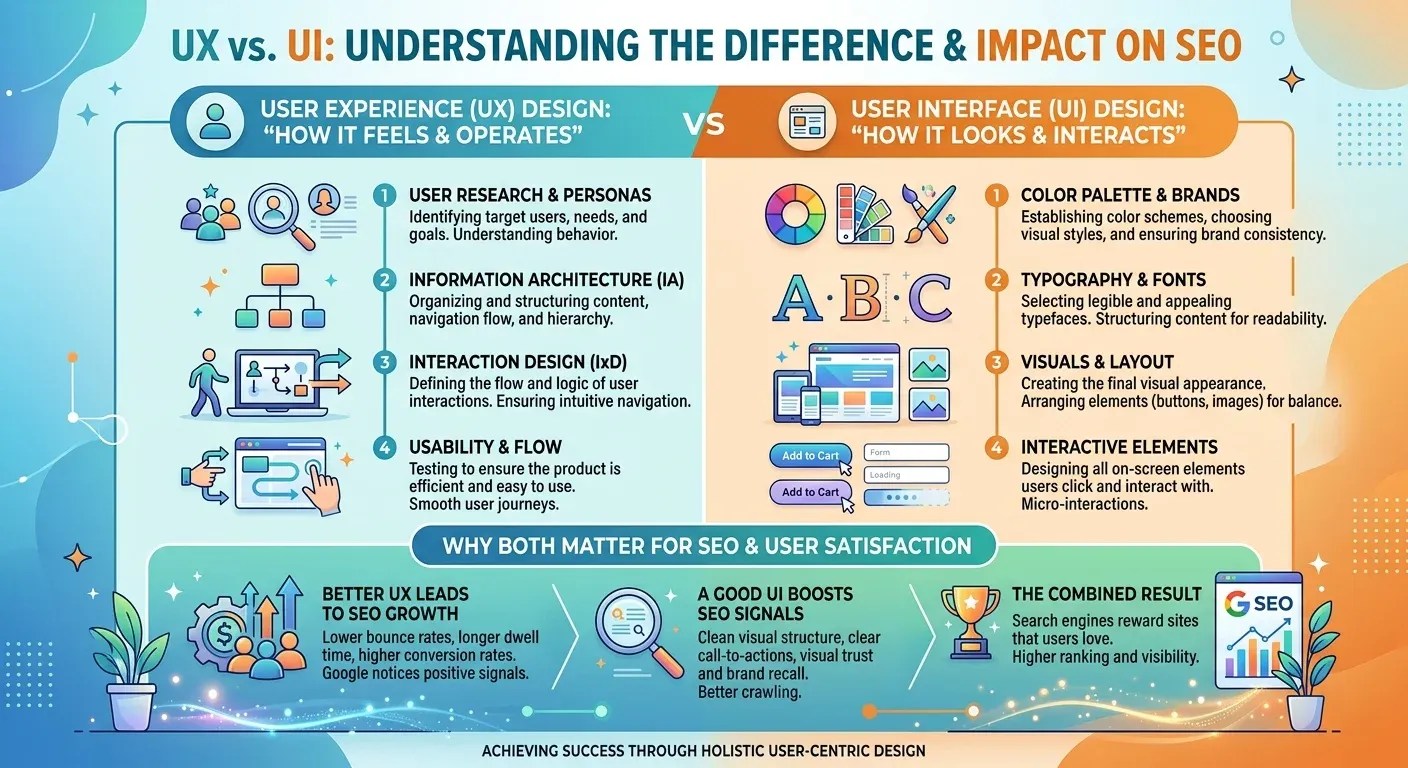
The cleanest analogy: UX is the floor plan of a building, and UI is the interior design. The floor plan determines whether the space functions — whether traffic flows naturally, whether rooms connect logically, whether a visitor can find what they came for without getting lost. The interior design determines how that space looks and feels once the structure is right. A beautifully decorated room with a confusing layout is still confusing. A logical layout with no attention to visual quality feels cold and unfinished. Both matter. Neither substitutes for the other.
What UX Design Actually Covers
User experience design encompasses everything that shapes how a visitor feels moving through a website — how intuitive the navigation is, how clearly the path from landing to conversion is laid out, whether the information architecture matches how the target audience thinks, and how efficiently a user can accomplish the goal that brought them there. UX work typically involves wireframing, user journey mapping, usability testing, and iterative refinement based on observed behavior rather than aesthetic preference.
Good UX is largely invisible to the user — when it works, the site simply feels easy to use. What surfaces when UX fails is friction: a user who can’t find the pricing page, a checkout flow that requires more steps than it should, a navigation that buries the most-needed page three levels deep. Friction doesn’t just frustrate users — it produces the behavioral signals Google uses to evaluate page quality.
What UI Design Actually Covers
Interface design covers the visual layer — typography, color, spacing, button design, iconography, and the overall visual hierarchy that guides a user’s eye toward what matters most on each page. Where UX asks “can the user find what they need,” UI asks “does the visual presentation make the most important element obviously important?” A well-designed interface reinforces the UX structure underneath it: clear visual hierarchy makes navigation intuitive, consistent design patterns reduce cognitive load, and a professional visual presentation builds the kind of trust that reduces abandonment before a conversion.
How UX Design Directly Impacts SEO Rankings
The connection between user experience and search rankings became substantially more direct in 2021 when Google formalized Core Web Vitals as ranking signals — but the underlying relationship predates that update considerably. Google has always tried to surface pages that satisfy users, and UX quality is one of the clearest signals of whether a page does.
Core Web Vitals as UX Signals
Core Web Vitals measure three specific aspects of page experience: how fast the largest visible element loads (Largest Contentful Paint), how stable the layout is as the page renders (Cumulative Layout Shift), and how quickly the page responds to the first user interaction (Interaction to Next Paint). All three are UX metrics dressed in technical clothing — they measure whether the experience of loading and using the page is smooth or frustrating. Sites that fail these thresholds don’t just have a technical problem; they have a user experience problem that Google now factors into ranking decisions.
Dwell Time and Bounce Rate as Quality Signals
Beyond Core Web Vitals, dwell time — how long a visitor stays on a page after clicking from search results — and bounce rate — how often they leave without interacting further — both reflect UX quality in aggregate. A page that ranks well but sends most visitors back to the SERP within twenty seconds is telling Google that something about the experience didn’t deliver what was promised. Over time, that behavioral signal can erode rankings even for pages that are technically well-optimized.
How UI Design Influences Conversions and Engagement
UI’s relationship to SEO is more indirect than UX’s but equally real. The mechanism runs through engagement: a polished, professional visual presentation increases the likelihood that a visitor trusts the site enough to engage, stay, and convert — and those engagement signals feed back into the quality indicators Google monitors.
Visual Hierarchy and Click Behavior
A page with clear visual hierarchy — where the most important element commands the most visual weight and the eye flows naturally from headline to supporting content to call-to-action — produces measurably different click behavior than a page where everything competes for equal visual attention. Visitors to a well-designed page take the path the design intends. Visitors to a visually cluttered page hesitate, scan without engaging, and abandon more often, which shows up in exactly the behavioral signals Google is watching.
Consistency as a Trust Signal
Consistent conversion design — predictable button placement, familiar interaction patterns, visual coherence across pages — reduces the cognitive effort a user spends figuring out how the site works and increases the trust that keeps them engaged. Trust is particularly important in any context where a user is considering providing personal information or making a payment: a design that feels inconsistent or unprofessional plants doubt at precisely the moment the conversion depends on confidence.
A Real Redesign: UX and UI Working Together
A regional legal services firm came to us with a site that ranked reasonably well for core service terms but had a conversion rate well below industry benchmarks. Analytics showed strong click-through rates from search — the SEO foundation was working — but users were landing and leaving without making contact.
The UX audit identified the core problem: the user journey from landing page to contact form was broken in two places. The primary navigation buried the “Contact” page under a dropdown that most users never opened, and the service pages ended abruptly without a clear next step — no CTA, no internal link to a contact option, no logical continuation of the journey.
The UI audit surfaced a separate but compounding issue: the visual design was inconsistent across pages — different button styles, mismatched heading weights, and a color palette that had drifted across site sections added up to a presentation that didn’t feel cohesive or authoritative.
The redesign addressed both layers in sequence. UX first: navigation restructured to surface contact options at every level, service pages rebuilt with explicit journey continuation at the bottom of each. UI second: a unified design system applied consistently across the entire site, with a visual hierarchy on each page that moved the eye from problem description to solution to contact option in a predictable sequence.
Results over the following three months: average session duration increased, bounce rate on service pages dropped meaningfully, and contact form submissions increased substantially — while organic rankings for primary service terms held steady and in some cases improved, reflecting the stronger engagement signals the redesigned pages were now generating.
Accessibility: The UX Layer That Helps Rankings Too
Accessibility sits at the intersection of UX and technical SEO in ways most businesses don’t fully recognize. A site built with proper semantic HTML, descriptive alt text, logical heading hierarchy, and keyboard-navigable elements isn’t just serving users with disabilities — it’s creating the exact markup structure that makes a site more crawlable and interpretable for search engines.
Semantic Structure as a Shared Foundation
Heading tags, alt attributes, ARIA labels, and descriptive link text serve two audiences simultaneously: assistive technologies that help users navigate, and search engine crawlers that use these signals to understand page structure and content. Investing in accessibility improvements frequently produces SEO improvements as a byproduct, not an accident — the underlying technical requirements overlap substantially.
Where to Start if Your Site Needs Both
When a site needs improvement in both UX and UI — which is more common than needing only one — the sequencing matters. Start with UX: no amount of visual polish compensates for a user journey that doesn’t lead logically to conversion. Fix the floor plan before redecorating.
The UX Audit First
A proper UX audit uses behavioral data — heatmaps, session recordings, funnel analysis — to identify where in the user journey people are dropping off and why. This produces a prioritized list of structural changes grounded in observed user behavior rather than design preference, which is what makes subsequent changes defensible beyond aesthetics.
Then the UI Pass
With the UX structure validated, the UI pass applies visual consistency, hierarchy improvements, and conversion design principles across the corrected foundation. This is the right order because UI decisions made on a broken UX foundation frequently need to be redone when the UX is eventually fixed — a waste of design investment that the correct sequence avoids.
Mobile UX: The Layer Most Desktop Audits Miss
A substantial and growing share of organic search traffic arrives on mobile devices, yet most UX audits are still conducted primarily on desktop. This gap produces a specific and costly blind spot: a site that feels intuitive on a wide screen can be genuinely broken on a phone, and the mobile user’s experience is now weighted heavily enough in Google’s mobile-first indexing that a desktop-optimized site with a neglected mobile experience is leaving both rankings and conversions on the table.
Mobile UX Failures That Desktop Audits Don’t Catch
Touch targets — buttons and links — that are sized for a mouse click are often too small for a reliable finger tap, producing frustrating mis-clicks that show up in session recordings as repeated attempts at the same element. Navigation menus that work elegantly as dropdowns on desktop frequently collapse into hamburger menus on mobile that bury key pages behind extra taps. Forms with small input fields and no autocomplete support create friction at precisely the moment a conversion depends on ease. None of these failures are visible during a desktop audit session, which is why a proper UX review tests both environments rather than treating mobile as a scaled-down version of the desktop experience.
Page Speed as a Mobile UX Priority
Mobile users on cellular connections experience page speed problems more acutely than desktop users on broadband, and slow load times on mobile produce sharper abandonment rates than the same speeds on desktop. Core Web Vitals scores are measured for mobile and desktop separately — a site that passes on desktop but fails on mobile has a real UX and ranking problem, regardless of how it looks in an aggregate performance report.
Getting Your UX and UI Working Together
The businesses that rank well and convert well tend to share a common characteristic: they’ve invested in both disciplines in the right order rather than treating a visual redesign as a substitute for UX work, or delaying UI investment because the UX feels functional enough. Both layers feed the signals Google uses to evaluate page quality, and both layers contribute to the experience that determines whether a visitor becomes a customer.
Not sure whether your site has a UX problem, a UI problem, or both? Get a free UX audit and find out exactly what’s driving visitors away before they convert.
Frequently Asked Questions
UX (user experience) design covers the structure and flow of a website — how easily users can navigate, find information, and complete their goal. UI (user interface) design covers the visual layer — typography, color, hierarchy, and the look of interactive elements. UX is the floor plan; UI is the interior design.
Google measures user experience signals directly through Core Web Vitals and indirectly through behavioral metrics like dwell time and bounce rate. A site with poor UX produces the kinds of user behavior — quick exits, low engagement — that signal to Google the page isn’t satisfying search intent, which can erode rankings over time.
Indirectly, yes. Strong visual design increases trust and engagement, which produces better behavioral signals. It also supports accessibility improvements that overlap with technical SEO requirements — semantic structure, descriptive markup, logical heading hierarchy — all of which benefit both users and search engine crawlers.
Always UX first. Visual improvements built on a broken user journey need to be partially redone when the UX is eventually fixed. Correct the structure and flow first, then apply visual consistency and hierarchy improvements on top of a foundation that actually works.
A UX audit uses behavioral data — heatmaps, session recordings, funnel drop-off analysis, and user surveys — to identify where in the user journey visitors are dropping off and why, producing a prioritized list of structural changes grounded in observed behavior rather than assumption or aesthetic preference.
Discover more from Web Pivots®
Subscribe to get the latest posts sent to your email.


You must be logged in to post a comment.